# 选用能力
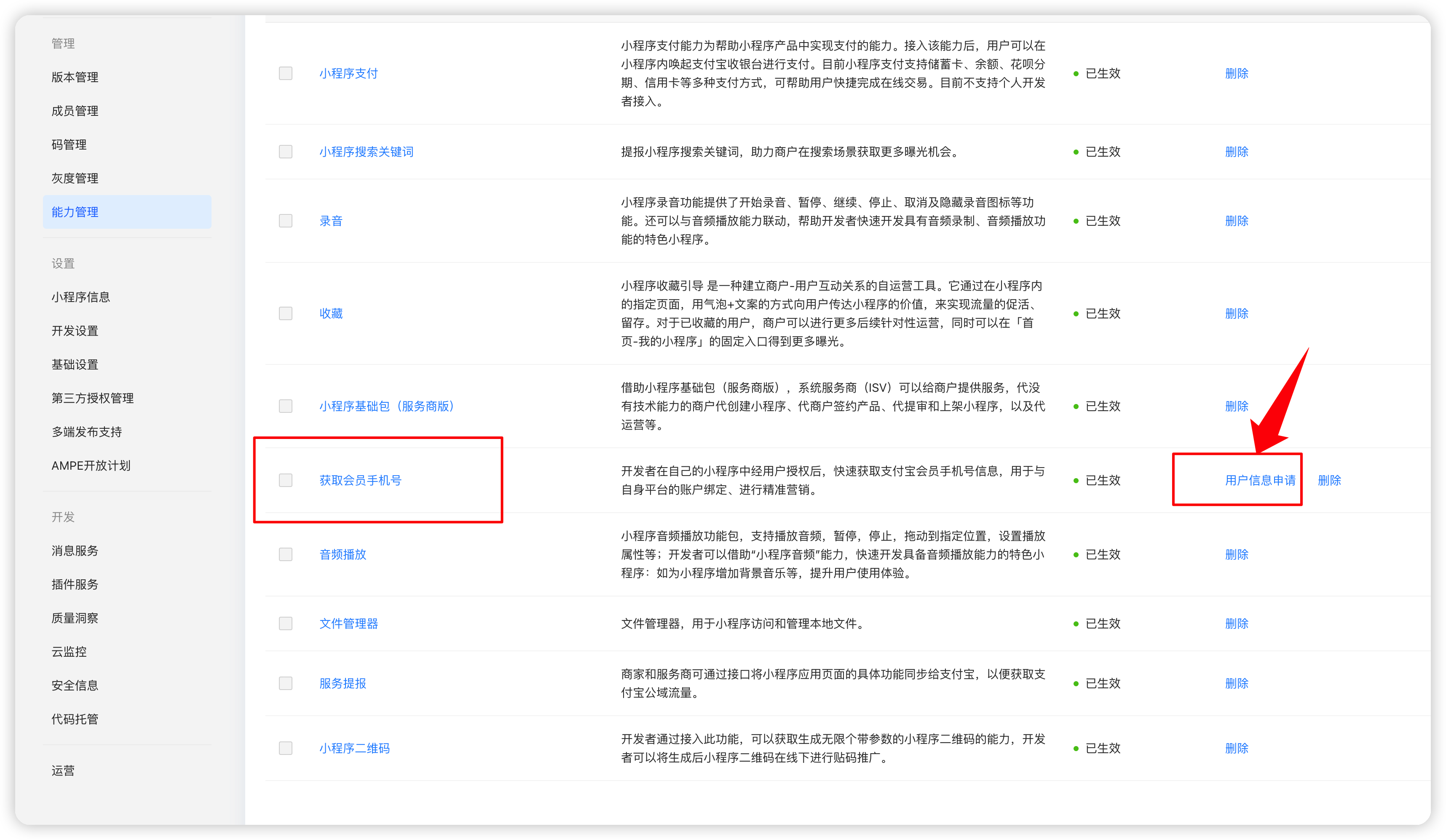
添加了这个能力以后,必须要通过后面的用户信息申请以后才能使用
# 小程序代码
[https://opendocs.alipay.com/mini/api/getphonenumber](https://opendocs.alipay.com/mini/api/getphonenumber)
```javascript
```
open-type 和 scope 是不能少的
```javascript
async getPhoneNumberAlipay() {
console.log(1111);
my.getPhoneNumber({
success: (res) => {
this._getPhoneNumberAlipay(res.response)
},
fail: (res) => {
console.log(res);
console.log('getPhoneNumber_fail');
},
})
},
async _getPhoneNumberAlipay(encryptedData) {
console.log(2222);
const res = await this.$wxapi.aliappBindMobile({
token: this.token,
encryptedData: encryptedData
})
if (res.code == 0) {
wx.showToast({
title: '绑定成功',
icon: 'success',
duration: 2000
})
this.$u.vuex('mobile', res.data)
} else {
wx.showModal({
title: '提示',
content: res.msg,
showCancel: false
})
}
},
onAuthError() {
console.log(33333);
console.log('onAuthErroronAuthErroronAuthErroronAuthErroronAuthError');
},
```