# 官方说明
[https://opendocs.alipay.com/open/199/105225?pathHash=07933824](https://opendocs.alipay.com/open/199/105225?pathHash=07933824)
根据说明去申请开通卡包权限
开通以后在小程序控制台的产品权限那里,绑定上卡包的产品权限
# 设计卡包模板
[https://opendocs.alipay.com/open/199/popvoucher](https://opendocs.alipay.com/open/199/popvoucher)
例如下面是一个可用的卡包模板:
```json
{
"evoucherInfo": {
"title": "福利领取200元购物红包",
"type": "marketVoucher",
"product": "free",
"startDate": "$activeTime$",
"endDate": "$expireTime$",
"operation": [
{
"format": "url",
"message": "alipays://platformapi/startapp?appId=2021004100636465&page=pages/index/index",
"altText": "立即使用"
}
],
"einfo": {
"logoText": "200元购物红包",
"secondLogoText": "红包仅限在本页购买部分实物商品使用",
"auxiliaryFields": [],
"backFields": [
{
"label": "使用须知",
"value": "使用说明:\n\n1.红包仅限于在本页面购买部分实物商品使用;\n2.红包仅可用于抵扣商品货款金额(不包含税费以及运费);\n3.红包仅限于单件商品的付款;\n4.红包核销时间:48小时内;\n5.红包核销范围:可核销于标有“秒杀”字样的商品;\n6.红包不可叠加使用;\n7.红包不得提现,不得转赠他人,不得为他人付款;\n8.每个商品限用1个红包,在提交订单进行付款时,系统会自动核销红包;\n9.购物红包由本小程序发放,如有疑问请联系客服。",
"type": "text"
}
],
"customFields": [],
"useLimitDesc": "",
"brandName": "购物红包",
"originPrice": "",
"banner": {
"bannerImg": "",
"url": ""
},
"passImg": "",
"passImgRatio": "2.79"
}
},
"platform": {
"channelID": "2021004100636465"
},
"style": {
"backgroundColor": "RGB(16,142,233)"
},
"fileInfo": {
"formatVersion": "4",
"canShare": true,
"canBuy": false,
"canPresent": false,
"serialNumber": "$serialNumber$"
},
"source": "alipassprod",
"merchant": {
"mname": "购物红包",
"mcallbackUrl": "https://api.it120.cc/alicps/alipayPass/b"
}
}
```
上面模板中的小程序 `appId`需要改成实际的小程序的 appId
`mcallbackUrl`请改成自己的真实回调地址【回调下面有说明】
# 创建卡包模板,获取模板ID
[https://user.api.it120.cc/doc.html](https://user.api.it120.cc/doc.html)
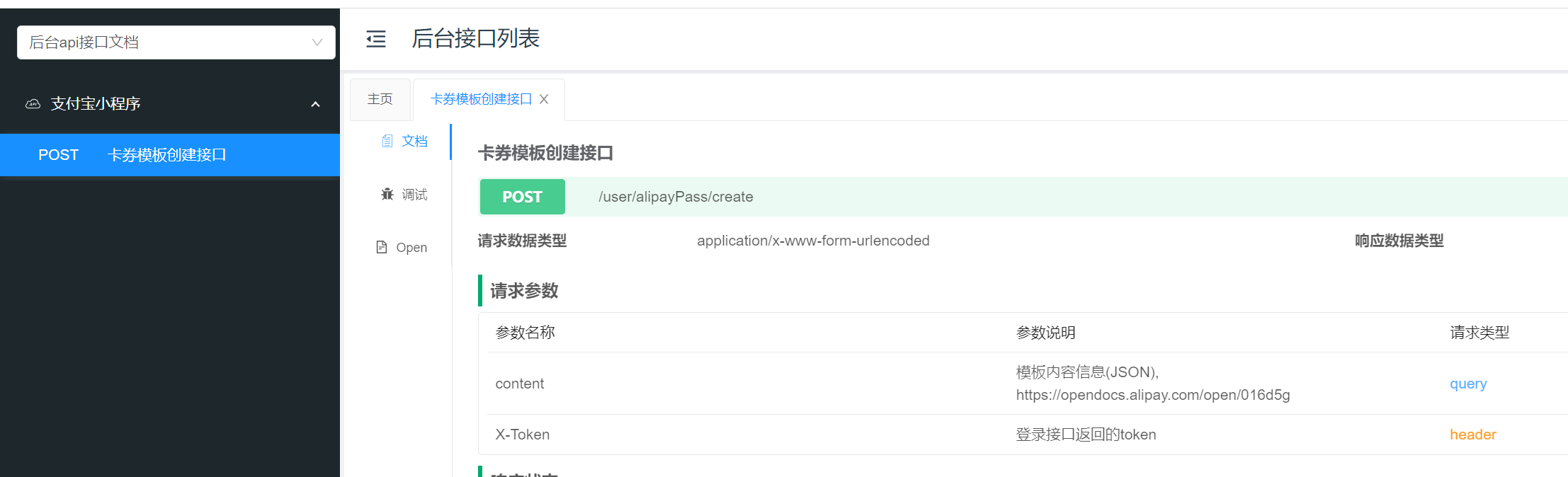
content 传上一步的卡包模板 json 字符串,接口返回的就是已经创建的模板ID
# 跳转到支付宝的卡包界面去领取卡券
[https://opendocs.alipay.com/open/199/popvoucher#%E7%AC%AC%E4%B8%89%E6%AD%A5%EF%BC%9A%E7%94%A8%E6%88%B7%E8%B7%B3%E8%BD%AC%E8%87%B3%E9%A2%86%E5%88%B8%E9%A2%84%E8%A7%88%E9%A1%B5](https://opendocs.alipay.com/open/199/popvoucher#%E7%AC%AC%E4%B8%89%E6%AD%A5%EF%BC%9A%E7%94%A8%E6%88%B7%E8%B7%B3%E8%BD%AC%E8%87%B3%E9%A2%86%E5%88%B8%E9%A2%84%E8%A7%88%E9%A1%B5)
例如:
```javascript
const curDate = new Date()
const expireTime = new Date(curDate.getTime() + 2 * 24 * 60 * 60 * 1000)
const templateParams = {
activeTime: this.dateFormat(curDate, 'yyyy-mm-dd') + ' 00:00:00',
expireTime: this.dateFormat(expireTime, 'yyyy-mm-dd') + ' 23:59:59'
}
window.ap.call('addCoupon',
{
userId: '支付宝用户的 userId,不是 openID 哦',
templateId: '上一步的卡包模板ID',
bizType: 'svPage',
templateParams: JSON.stringify(templateParams)
}, function(err) {
console.err(err);
})
```
# 用户领取卡包以后的回调
https://api.it120.cc/**gooking**/alipayPass/b
gooking 请改为自己的专属域名
支付宝回调以后,会将 `passId` 保存到“数据隧道中”,可以通过隧道接口读取:
[https://www.yuque.com/apifm/nu0f75/qvaupf](https://www.yuque.com/apifm/nu0f75/qvaupf)
```javascript
WXAPI.channelDataPull('channelData_alipayPass_fetch_支付宝用户ID')
```
`支付宝用户ID`换成真实的userId
后续可以用 `passId`来查询后续发券结果